
RL6 RootCause 180-Day File Analysis
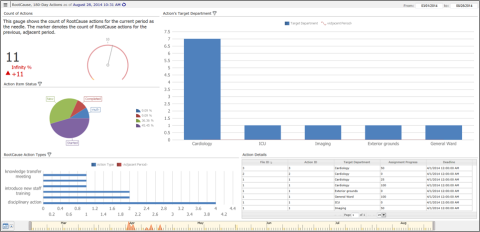
The dashboard below is meant for root cause investigators and owners with a risk role. It gives an overview of the number of actions for the current year, action status, and action types.
The attributes of this dashboard are as follows:
- Date – entered date (RL6 RootCause); incident date (RL6 Risk)
- Conditions – file state = new, in-progress or closed
- ScopeThe files to which you have access. – on
- Location drill – Site --> Care/Service Area --> DepartmentThe department or section within the laboratory that performs the tests.
|
Field Caption |
TableName.FieldName |
|
File ID |
File.PK / IncidentFile.PK |
|
Incident |
EventWhenWhere.EventDate / Incident.EventDate |
|
File State |
File.FileState / IncidentFile.FileState |
|
File ID |
RCAFile.PK |
|
Entered Date |
RCAFile.EnteredDate |
|
File State |
RCAFile.File State |
|
Equipment Involved/Malfunctioned? |
RootCauseUDFS.EquipmentInvolvedMalfunctioned |
|
Reason for RCA |
RCACase.Reason |
|
Site |
RootCauseUDFS.Site |
|
Care/Service Area |
RootCauseUDFS.CareServiceArea |
|
Department |
RootCauseUDFS.EventDepartment |
|
RootCauseUDFS.GeneralEventType |