Assigning a Suggested Task
While managing a file, you may be able to use and assign suggested tasks if the file meets certain conditions defined by your administrator. The first time you open a file and save changes, suggested tasks may be displayed if there are suggested tasks available for the file.
Note: Options are available only if Task Packages have been defined by your administrator. You must have the "Create TasksA unit of work, such as a follow-up, review or request for information, which can be tied to a specific file. associated with files" role permission in order to perform this procedure.
To view and assign a suggested task to a file:
- Open the management form.
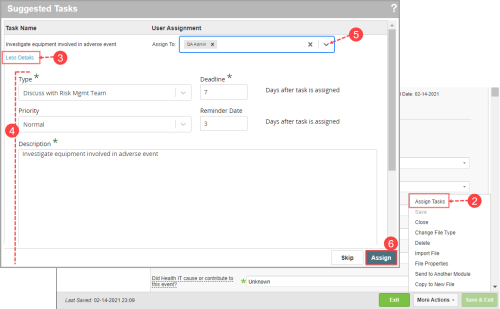
- Go to More Actions > Assign Tasks. The Suggested Tasks dialog is displayed.
- If there are suggested tasks listed, click the More Details link to view any of the task details. (Click Less Details to hide the task details.) Note: If there are no assigned tasks for this file, you can click Cancel to close the dialog or click Create new task to manually create a new task.
- (Optional) Edit the task details (e.g. Description, due date, reminder date) if needed. Note: Any modifications will be saved for the specific task and does not affect the task template.
- For each suggested task, go to the Assign To field, select the user(s) to whom the task is assigned. A task is created for each assigned user.
- Click Assign. Note: If you do not assign all tasks at once, a confirmation message is displayed upon clicking Assign to allow you to continue assigning only those tasks selected or return to assign more. If you are not ready to assign any tasks, click Skip to close the dialog.
- A confirmation message is displayed (not shown). Click OK to close the dialog.
The tasks are created and assigned to the selected users. You can view or modify the task from the File Notification panel (see Creating Tasks for a File) when the file is open or from the Tasks page (Adding and Modifying Tasks).
Note: All remaining unassigned suggested tasks are available to be assigned at any later time.