Only parties where the Show party in insurance section box is checked The person in charge of managing and maintaining RL6. Guide)
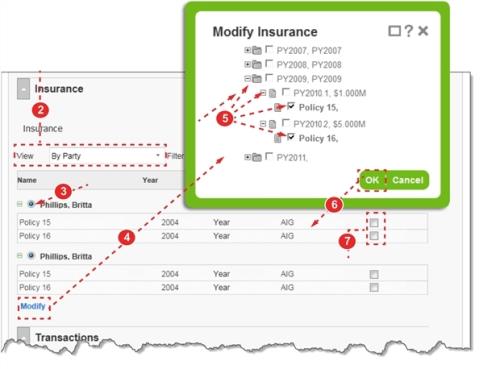
To assign insurance to a party:
- Open a file.
- Scroll to the Insurance section (or use the Contents widget) and select
By Partyfrom the View list. - Select the party to whom you would like to assign insurance.
- Click the Add or Modify action link. The Modify Insurance
- Click the
[+]to view the policy tiers and policies that are available and check the policies, tiers or year that you would like to associate with the party. - Tip: While you can assign various coverage types to the party, you should limit your selection to one coverage type, as shown.
- Click OK. The selected policies appear under the party.
- Check the Exp Erode Aggregate box to include transactions recorded against the policy for reporting purposes.
- Note: Once insurance is assigned to the party, an option to split transactions by insurance appears after it is split by party (Completing the Transactions Section).